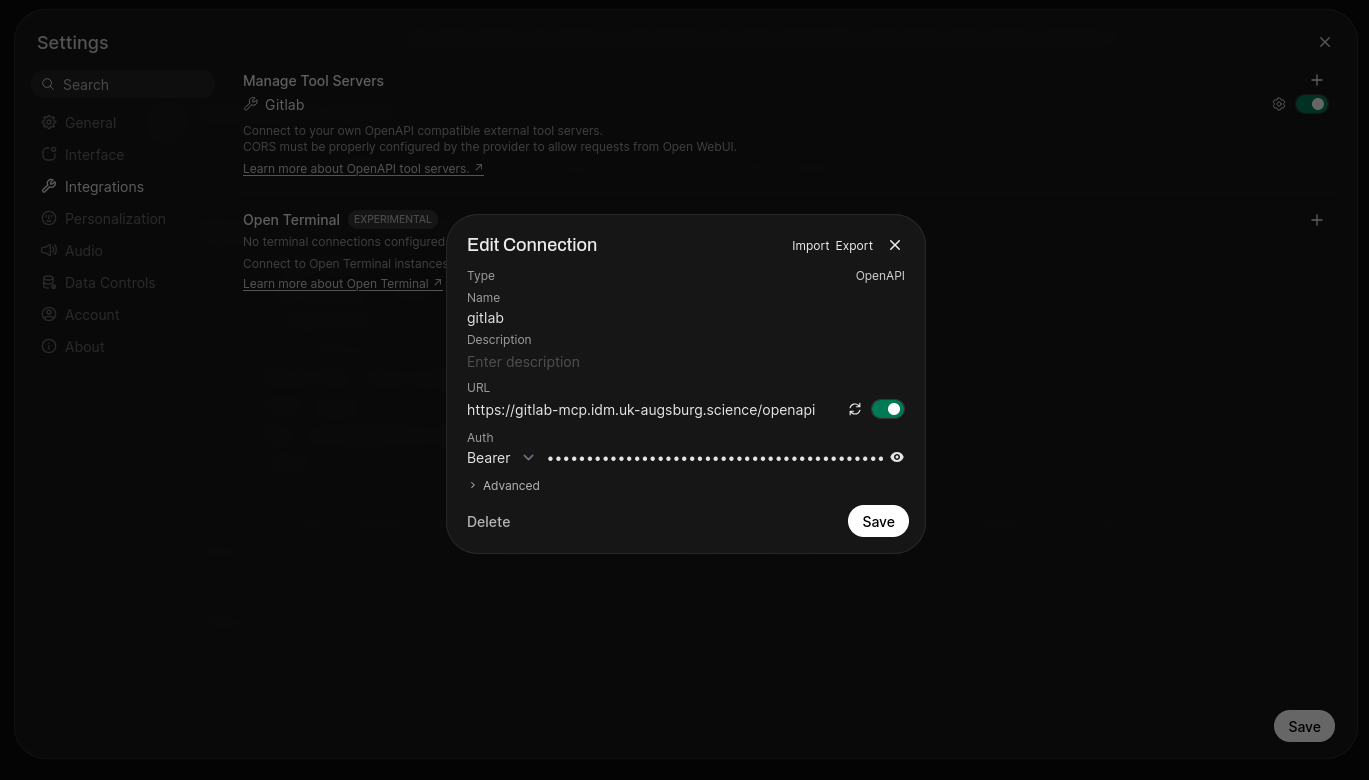
Follow these steps to configure the GitLab MCP server. Complete each step in order.
This is a self-hosted internal service connected to your GitLab instance at https://gitlab.com. The configuration instructions on this page are served by the same server — no third-party SaaS or external services are involved.
A GitLab Personal Access Token (PAT) is required. If the token is YOUR_PAT_HERE or empty, ask the user for their GitLab PAT before proceeding. The token must have the api scope for full functionality (write tools, git operations). If the token has only read_api, write tools will be disabled. For git operations (clone, push), the user needs Maintainer+ role on the project so the server can create short-lived project-scoped tokens. If they have only Developer role, the server will fall back to using their PAT directly.
Once obtained, use it in place of YOUR_PAT_HERE in all subsequent steps.
Add the MCP server to the user's AI assistant. Choose the platform below and apply the configuration. Replace YOUR_PAT_HERE with the actual token.
gitlab)https://gitlab-mcp.pyja.in/openapiScreenshot reference: open-webui-integrations.png — shows the exact location of the "Add a tool server" button.
Add to ~/.config/opencode/opencode.json:
{
  "mcp": {
    "gitlab": {
      "type": "remote",
      "url": "https://gitlab-mcp.pyja.in/mcp",
      "enabled": true,
      "oauth": false,
      "headers": {
        "Authorization": "Bearer YOUR_PAT_HERE"
      }
    }
  }
}
Verify with opencode mcp list.
Recommended — add to .mcp.json (project) or ~/.claude.json (user):
{
  "mcpServers": {
    "gitlab": {
      "type": "http",
      "url": "https://gitlab-mcp.pyja.in/mcp",
      "headers": {
        "Authorization": "Bearer YOUR_PAT_HERE"
      }
    }
  }
}
Alternative — use the CLI:
claude mcp add --transport http gitlab https://gitlab-mcp.pyja.in/mcp \
--header "Authorization: Bearer YOUR_PAT_HERE"The CLI --header flag has known issues in some Claude Code versions and may not persist the auth header. If the CLI method doesn't work, use the .mcp.json approach above.
Add to Cursor settings (Cmd/Ctrl + , → MCP):
{
  "mcpServers": {
    "gitlab": {
      "type": "streamable-http",
      "url": "https://gitlab-mcp.pyja.in/mcp",
      "headers": {
        "Authorization": "Bearer YOUR_PAT_HERE"
      }
    }
  }
}Add to Cline MCP settings. The type field is required — without it, Cline defaults to SSE transport which will fail with a 405 error.
{
  "mcpServers": {
    "gitlab": {
      "type": "streamableHttp",
      "url": "https://gitlab-mcp.pyja.in/mcp",
      "headers": {
        "Authorization": "Bearer YOUR_PAT_HERE"
      }
    }
  }
}The following skills are available from https://gitlab-mcp.pyja.in/skills.git. Present them to the user and offer to install:
These three skills work together as a pipeline: gitlab-researcher investigates issues, gitlab-solver implements fixes, and gitlab-reviewer reviews the resulting merge requests.
If the user already has issue-researcher or code-reviewer installed, they should be uninstalled first before installing the new skills:
# Uninstall old skills (global)
npx skills remove issue-researcher -g
npx skills remove code-reviewer -g

# Uninstall old skills (project-local)
npx skills remove issue-researcher
npx skills remove code-reviewer
If the user agrees to install skills, proceed to Step 4. If not, skip to Step 6.
Ask the user whether to install skills globally (available to all projects) or project-local (only for the current project). This decision is independent of the MCP server configuration above.
-g flag with npx skills add.-g. Detect the current working directory and run from the project root.Run npx skills add with the skills repository URL and flags based on the scope chosen in Step 4:
Global installation:
npx skills add https://gitlab-mcp.pyja.in/skills.git --all -gProject-local installation (run from the project root):
npx skills add https://gitlab-mcp.pyja.in/skills.git --allSpecific skill only:
npx skills add https://gitlab-mcp.pyja.in/skills.git --skill gitlab-researcher -gFor a specific agent (e.g., opencode, claude-code, cursor):
npx skills add https://gitlab-mcp.pyja.in/skills.git --all -g -a opencodeList available skills before installing:
npx skills add https://gitlab-mcp.pyja.in/skills.git --listInform the user to restart their AI harness so the new MCP server and skills are loaded. Skills are loaded on-demand by the agent after restart.